The defense lasted all of an extremely terrifying eleven minutes, but I somehow managed to come up with the right words. Three minutes after leaving the defense, my phone dinged. An email informed me that I had passed. I replied to the email: "Are you sure you have the right person?"
Fifteen minutes later, I received an email saying that yes, I had indeed passed. So yay.
Another chapter comes to a close in just over two weeks.
Showing posts with label OU. Show all posts
Showing posts with label OU. Show all posts
Sunday, April 24

Saturday, April 2
Defense!
I have to defend one answer on my comprehensive exam. This means that I passed 2/3 of the exam. This also means that I have to go before three faculty members and make my case about why I answered the way I answered. I'll know in a few days when I will go defend, which will be within the next two weeks.
What I also learned yesterday, apart from my score, is that defenses generally last 30 minutes to an hour. AN HOUR! And that the faculty members will ask me questions and MAY ask questions outside the scope of the original question.
I have too much to do (all due Monday) to start studying for my defense now, so I hope that I have ample time to prepare for the defense before I actually have to defend. I also hope I don't turn into a babbling, puking fool in front of the faculty members.
And I really hope I pass.
What I also learned yesterday, apart from my score, is that defenses generally last 30 minutes to an hour. AN HOUR! And that the faculty members will ask me questions and MAY ask questions outside the scope of the original question.
I have too much to do (all due Monday) to start studying for my defense now, so I hope that I have ample time to prepare for the defense before I actually have to defend. I also hope I don't turn into a babbling, puking fool in front of the faculty members.
And I really hope I pass.
Sunday, January 23
60. 110.
The comprehensive exam is in 60 days.
The end of the semester is in 110 days.
Graduation is sometime around the end of the semester.
I need to get a move on and start studying. The days will dwindle quickly.
The end of the semester is in 110 days.
Graduation is sometime around the end of the semester.
I need to get a move on and start studying. The days will dwindle quickly.
Friday, April 2
Public domain does not give permission to slaugther a classic!
I have voiced my opinion of Seth Grahame-Smith's Pride and Prejudice and Zombies on many occasions. I. Hate. It. I haven't read the book nor do I have plans to read the book because I consider it an abomination against the wonderfulness that is Jane Austen's Pride and Prejudice.
Not long after the release of Zombies, the same company released a new version of another Jane Austen work, Sense and Sensibility and Sea Monsters. Why a company or an author feels it is necessary to pair greatness with something as out-of-left-field as zombies or sea monsters (especially when Sense and Sensibility takes place inland and not near the sea!) is beyond me. It is truly beyond the beyonds.
People tell me that I should give Zombies a shot. That it is actually pretty funny. And some individuals make the argument that books like Zombies are opening up Austen's works to a new generation. But, truthfully, if this is the only way to get newer generations interested in Jane Austen, I'd rather no one else read her.
For an assignment, I had to evaluate selection tools in choosing materials for collection development. I found an intriguing article in Newsweek regarding the apparent disrespect of these new turns on Austen's works: "Not-So-Plain Jane". The following quote by the article's author Sarah Ball nicely sums up my feelings toward these awful mash-ups of literary classics.
And don't get me started on the insanity of Abraham Lincoln as a vampire hunter. Like he had time to hunt vampires. His great height would have made him a horrible vampire hunter. Vampires could have leveled him easily. Come on, people!
Not long after the release of Zombies, the same company released a new version of another Jane Austen work, Sense and Sensibility and Sea Monsters. Why a company or an author feels it is necessary to pair greatness with something as out-of-left-field as zombies or sea monsters (especially when Sense and Sensibility takes place inland and not near the sea!) is beyond me. It is truly beyond the beyonds.
People tell me that I should give Zombies a shot. That it is actually pretty funny. And some individuals make the argument that books like Zombies are opening up Austen's works to a new generation. But, truthfully, if this is the only way to get newer generations interested in Jane Austen, I'd rather no one else read her.
For an assignment, I had to evaluate selection tools in choosing materials for collection development. I found an intriguing article in Newsweek regarding the apparent disrespect of these new turns on Austen's works: "Not-So-Plain Jane". The following quote by the article's author Sarah Ball nicely sums up my feelings toward these awful mash-ups of literary classics.
"These books are objectionable because they strike out Austen's greatest contributions—seething satire, brilliant language, critique of classism—while helping themselves to the benefits of her name brand."
And don't get me started on the insanity of Abraham Lincoln as a vampire hunter. Like he had time to hunt vampires. His great height would have made him a horrible vampire hunter. Vampires could have leveled him easily. Come on, people!
Sunday, October 4
23 Things: Thing 23
Hooray! I've conquered the 23 Things!
Looking back on my experience, I can't believe how many useful tools (like 30 Boxes and Research Project Calculator) are out there. I wish that I had known about some of these tools earlier. Maybe I'll incorporate those tools into my school schedule, in the hopes of keeping myself more organized.
I think that the 23 Things should be done by anyone who is in an information field. I feel like I have a better grasp on RSS feeds and anything Google has to offer. Now that I know how to use these tools/items/what-have-you firsthand, I'm in a better position to effectively aid patrons who are interested in these tools.
Looking back on my experience, I can't believe how many useful tools (like 30 Boxes and Research Project Calculator) are out there. I wish that I had known about some of these tools earlier. Maybe I'll incorporate those tools into my school schedule, in the hopes of keeping myself more organized.
I think that the 23 Things should be done by anyone who is in an information field. I feel like I have a better grasp on RSS feeds and anything Google has to offer. Now that I know how to use these tools/items/what-have-you firsthand, I'm in a better position to effectively aid patrons who are interested in these tools.
23 Things: Thing 22
I am making a resolution to update this blog more often, whether with school or work related items or a bunch of mixed-up jibber jabber. Several years ago, I posted at least one time a week, ranting or commenting about something that had happened to me that day or week. It is something that I'd like to get back into the habit of doing.
As this exercise has taught me, it doesn't take much time to utilize Web 2.0 tools or make a blog entry. While I may not keep up with all the latest innovations or even updates of the applications and things I've encountered during 23 Things, I do plan on using the online image generators for programs and creative flyers.
Also, I plan to keep on playing Puzzle Pirates when the mood strikes. Some of those games are really fun!
As this exercise has taught me, it doesn't take much time to utilize Web 2.0 tools or make a blog entry. While I may not keep up with all the latest innovations or even updates of the applications and things I've encountered during 23 Things, I do plan on using the online image generators for programs and creative flyers.
Also, I plan to keep on playing Puzzle Pirates when the mood strikes. Some of those games are really fun!
Saturday, October 3
23 Things: Thing 21
Did you know that there are other social networking sites? I've visited a few sites (like last.fm and Imeem), but didn't realize they were social networking sites until today. I am a member of Imeem, but I seriously just go there for the music. I've never interacted with anyone.
And yes, I realize I'm antisocial. Probably why no one wanted to talk to me on Puzzle Pirates when I attempted to start a conversation or two. ;)
Of the social networking sites I perused today, two seemed interesting: 43 Things and WebJunction. I tried to list 43 things that I wanted to do with my life, but I only came up with 12. I don't know if this is a reflection on my ambitions or a reflection on my sleepiness.
However, WebJunction looks most promising! The site offers online learning and discussion for library organizations throughout the world. I'd not heard of WebJunction before this exercise; however, after looking through the WebJunction site, I found out that my library does know about this service and that we utilize the Amigos Library Services quite often. In fact, I'm taking a webinar this Wednesday on going green.
And yes, I realize I'm antisocial. Probably why no one wanted to talk to me on Puzzle Pirates when I attempted to start a conversation or two. ;)
Of the social networking sites I perused today, two seemed interesting: 43 Things and WebJunction. I tried to list 43 things that I wanted to do with my life, but I only came up with 12. I don't know if this is a reflection on my ambitions or a reflection on my sleepiness.
However, WebJunction looks most promising! The site offers online learning and discussion for library organizations throughout the world. I'd not heard of WebJunction before this exercise; however, after looking through the WebJunction site, I found out that my library does know about this service and that we utilize the Amigos Library Services quite often. In fact, I'm taking a webinar this Wednesday on going green.
23 Things: Thing 20
Social networking sites are almost unavoidable at this point. I know that they can be avoided, but most individuals I know have a Facebook page or a Myspace page. Many have both. I have had both at one time or another, but I've only kept the Facebook page. I don't care for all the crazy backgrounds and music that can be included in Myspace pages. I realize that the customization is all about creatively expressing one's self. That's fine, but those backgrounds can make things hard to read.
I have seen several Myspace pages maintained by libraries. My library has recently joined Facebook and has created pages for the system and pages for each individual branch. The teens at my branch will soon have a page of their own when I (or they) decide on a name. I've asked for suggestions, but the kids aren't offering much. So, we'll see how that goes.
I've joined several Facebook groups and created one of my own. I think that Facebook's reputation as the fastest growing social network is valid. I mean, the history of Facebook speaks for itself. What started as a small social networking site among a limited number of colleges has expanded to include all individuals across all continents in less than 5 years (I think).
I have seen several Myspace pages maintained by libraries. My library has recently joined Facebook and has created pages for the system and pages for each individual branch. The teens at my branch will soon have a page of their own when I (or they) decide on a name. I've asked for suggestions, but the kids aren't offering much. So, we'll see how that goes.
I've joined several Facebook groups and created one of my own. I think that Facebook's reputation as the fastest growing social network is valid. I mean, the history of Facebook speaks for itself. What started as a small social networking site among a limited number of colleges has expanded to include all individuals across all continents in less than 5 years (I think).
23 Things: Thing 19
Back in the day (re: a few years ago), I used to listen to the GrammarGirl podcast regularly. That was my only foray into podcasts.
This Thing required me to seek out podcast and just try them out in general. The Thing also had a link to GCast, which used to be a free, easy way to create a podcast via phone. However, there is now a yearly subscription fee to create a podcast via phone.
I tried out several podcast directories. The easiest one to use (for me) was Podcast Alley. I used a very generic search term (books) and found 200 results. I listened to a few podcasts, but only one kept my attention: Books on the Nightstand. The two podcasters work in the publishing industry and have interesting discussions and reviews of books.
Although I found an interesting podcast, I don't think I'll listen to the podcast regularly. I don't enjoy disembodied voices talking to me. I like to have something to see as well as hear. I've never been a big audio book fan, either. When I was younger, the audio book would be accompanied by the book in print form. I ended up reading ahead of the narrator. And in the car, I rarely listen to the radio (except for 80's night!). It's all CDs of my own mixing all the time.
I also don't think I'll make a podcast of my own any time soon. I could use one to reach out to the teen group at my library, but many of them do not have home computers and use library computers, where listening to things like podcasts are forbidden.
Perhaps in the future, though.
This Thing required me to seek out podcast and just try them out in general. The Thing also had a link to GCast, which used to be a free, easy way to create a podcast via phone. However, there is now a yearly subscription fee to create a podcast via phone.
I tried out several podcast directories. The easiest one to use (for me) was Podcast Alley. I used a very generic search term (books) and found 200 results. I listened to a few podcasts, but only one kept my attention: Books on the Nightstand. The two podcasters work in the publishing industry and have interesting discussions and reviews of books.
Although I found an interesting podcast, I don't think I'll listen to the podcast regularly. I don't enjoy disembodied voices talking to me. I like to have something to see as well as hear. I've never been a big audio book fan, either. When I was younger, the audio book would be accompanied by the book in print form. I ended up reading ahead of the narrator. And in the car, I rarely listen to the radio (except for 80's night!). It's all CDs of my own mixing all the time.
I also don't think I'll make a podcast of my own any time soon. I could use one to reach out to the teen group at my library, but many of them do not have home computers and use library computers, where listening to things like podcasts are forbidden.
Perhaps in the future, though.
23 Things: Thing 18
Ah, YouTube. My dear little time-sucking friend.
I've (fortunately or unfortunately... not real sure) explored YouTube on many occasions, most usually when I'm bored. Right now, because I'm low on funds, time, and musicians who will come my way, I've taken to using the site to get quick live music fixes. I know, I know; it's not really live music if it has been recorded. But it's all I've got right now.
Today, I searched for videos including Nathan Angelo. He's been on rotation in my car the past few months (sharing time with Dave Barnes and Rob Blackledge). Gosh, darnit, I'd love to see him play live. So, I found a video of Nathan playing his song "Someday Soon" on August 6, 2009. The video is pretty dark, but you can see Nathan and his keyboard. Plus, the sound is great. Sometimes, the videos on YouTube have horrible sound.
It's really easy to use YouTube to find entertaining or other types of videos. I mostly use it for entertainment purposes. And the site can seriously suck time. Each video has links to similar videos and other videos by the poster. There's always some kind of video catching my eye and dragging me deeper and deeper into the recesses of YouTube.
Anyway, I now present Nathan Angelo:
I've (fortunately or unfortunately... not real sure) explored YouTube on many occasions, most usually when I'm bored. Right now, because I'm low on funds, time, and musicians who will come my way, I've taken to using the site to get quick live music fixes. I know, I know; it's not really live music if it has been recorded. But it's all I've got right now.
Today, I searched for videos including Nathan Angelo. He's been on rotation in my car the past few months (sharing time with Dave Barnes and Rob Blackledge). Gosh, darnit, I'd love to see him play live. So, I found a video of Nathan playing his song "Someday Soon" on August 6, 2009. The video is pretty dark, but you can see Nathan and his keyboard. Plus, the sound is great. Sometimes, the videos on YouTube have horrible sound.
It's really easy to use YouTube to find entertaining or other types of videos. I mostly use it for entertainment purposes. And the site can seriously suck time. Each video has links to similar videos and other videos by the poster. There's always some kind of video catching my eye and dragging me deeper and deeper into the recesses of YouTube.
Anyway, I now present Nathan Angelo:
23 Things: Thing 17
This thing discusses ELM productivity tools, which are resources provided by Electronic Libraries for Minnesota (ELM). Many libraries and states offer similar tools, including access to databases EBSCO and access to e-books and audio books such as NetLibrary.
I have personally used databases like EBSCO, ArticleFirst, and ProQuest since the 11th grade (8-9 years ago). Databases are tremendously helpful in locating peer-reviewed articles and resources for research papers and essays. While some items are not available in full text, there are a large number of items that are available in full text and can be printed. I don't have much experience with NetLibrary, but I do have an account and plan to utilize the tool more in the future.
I use databases regularly for graduate school coursework and for work (on occasion). I have also referred patrons to online databases when they are in need of resources for scholarly endeavors or are interested in a specific topic. Usually, I have to walk a patron through the process of access the database. After the initial introduction, patrons usually have no problem using databases to find relevant information.
I have personally used databases like EBSCO, ArticleFirst, and ProQuest since the 11th grade (8-9 years ago). Databases are tremendously helpful in locating peer-reviewed articles and resources for research papers and essays. While some items are not available in full text, there are a large number of items that are available in full text and can be printed. I don't have much experience with NetLibrary, but I do have an account and plan to utilize the tool more in the future.
I use databases regularly for graduate school coursework and for work (on occasion). I have also referred patrons to online databases when they are in need of resources for scholarly endeavors or are interested in a specific topic. Usually, I have to walk a patron through the process of access the database. After the initial introduction, patrons usually have no problem using databases to find relevant information.
23 Things: Thing 16
From the "Wow-didn't-even-know-things-like-this-exist" category, there are web applications that enable students to plan out research papers step by step: Research Project Calculator and the Assignment Calendar from the University of Minnesota libraries. The latter is geared towards undergraduate students and enables them to create a step by step map of when they should be doing what in their papers or assignments. Very useful if the student thrives on meeting small deadlines and is intent on doing his or her best. Unfortunately, many college students wait until the last minute before even thinking about the assignment.
The Research Project Calculator is for secondary students. The site contains resources for teachers to aid them in describing and educating students about the RPC. Additionally, there are resources to aid school library media specialists to do the same. The resources are offered in PDF and MS Word formats and cover everything a teacher or library media specialist would need to introduce RPC to students (graphic organizers, search techniques, writing transitions, etc).
While I currently work in a public library and plan to do so in the future, I probably won't get to use or educate students about the wonderfulness of the RPC. But, if the occasion arises, I can point area teachers in the direction of the RPC resource.
I wish there were things like the RPC when I was in high school. We did two research papers and both existed of lots of index cards and miscellaneous notes all over the place. Not very efficient.
The Research Project Calculator is for secondary students. The site contains resources for teachers to aid them in describing and educating students about the RPC. Additionally, there are resources to aid school library media specialists to do the same. The resources are offered in PDF and MS Word formats and cover everything a teacher or library media specialist would need to introduce RPC to students (graphic organizers, search techniques, writing transitions, etc).
While I currently work in a public library and plan to do so in the future, I probably won't get to use or educate students about the wonderfulness of the RPC. But, if the occasion arises, I can point area teachers in the direction of the RPC resource.
I wish there were things like the RPC when I was in high school. We did two research papers and both existed of lots of index cards and miscellaneous notes all over the place. Not very efficient.
Wednesday, September 30
23 Things: Thing 15
Today, on 23 Things.... online games and games in the library!
Now, at my library, we discourage all games that are not already on the computer (Free Cell, Solitaire, etc). Games, streaming video, music, and the like have a tendency to slow down our computer system (Internet) across the county. So, online games don't have a place in my current library.
However, I looked into the Massive Multiplayer Online Role Playing Game (MMORPG) known as Puzzle Pirates. The game comes with tutorials, but it was pretty easy for me to pick up how to do things without reading. This free online game allows users to sail the high seas aboard a pirate ship, playing puzzles in the place of real pirating tasks on ship. I played through a few duty tasks (bilging, carpentry, and sailing) and I have to admit, it was really entertaining!
The game also allows for interactive collaboration among players. A player can converse and play against other players. According to the wiki for the game, there have even been individuals who have met on the game and married in real life! I tried several times to speak to my fellow pirates(not with the intention of marriage, mind you), but no one felt inclined to reply. Additionally, I approached a lad with the intent of speaking to him and an option appeared to make him "me hearty!" I can only imagine that that is pirate-speak for boyfriend or the like, but I didn't go there.
It took me a while (probably ten minute or so) before I realized how to converse with other members. A player must click on the circle around the player he or she wants to speak with and enter his or her words into a chat applet at the bottom of the game. I'm probably just tired (re: dumb) and didn't notice that the chat function was there.
Anyhow, it was an interesting foray into the MMORPG world. Although I do not have time for games or anything really, I added the game to my favorites list. The puzzle games were fun and I'd like to play them again some time.
Now, at my library, we discourage all games that are not already on the computer (Free Cell, Solitaire, etc). Games, streaming video, music, and the like have a tendency to slow down our computer system (Internet) across the county. So, online games don't have a place in my current library.
However, I looked into the Massive Multiplayer Online Role Playing Game (MMORPG) known as Puzzle Pirates. The game comes with tutorials, but it was pretty easy for me to pick up how to do things without reading. This free online game allows users to sail the high seas aboard a pirate ship, playing puzzles in the place of real pirating tasks on ship. I played through a few duty tasks (bilging, carpentry, and sailing) and I have to admit, it was really entertaining!
The game also allows for interactive collaboration among players. A player can converse and play against other players. According to the wiki for the game, there have even been individuals who have met on the game and married in real life! I tried several times to speak to my fellow pirates(not with the intention of marriage, mind you), but no one felt inclined to reply. Additionally, I approached a lad with the intent of speaking to him and an option appeared to make him "me hearty!" I can only imagine that that is pirate-speak for boyfriend or the like, but I didn't go there.
It took me a while (probably ten minute or so) before I realized how to converse with other members. A player must click on the circle around the player he or she wants to speak with and enter his or her words into a chat applet at the bottom of the game. I'm probably just tired (re: dumb) and didn't notice that the chat function was there.
Anyhow, it was an interesting foray into the MMORPG world. Although I do not have time for games or anything really, I added the game to my favorites list. The puzzle games were fun and I'd like to play them again some time.
Monday, September 28
23 Things: Thing 14
It's a bird! It's a plane! It's LibraryThing!!
So, what is LibraryThing? It is a site that lets users create online catalogs of their own collections as well as browse the online collections of others. I've played around on LibraryThing before, but today I made an account. I don't have a large collection of books I own, but I have read a lot of books. Additionally, I love books and would like to own more. But I often have trouble keeping track of which books I own and which books I completely love. I think LibraryThing will allow me to find a more diverse selection of books and perhaps find books that I will greatly enjoy. I've been told that I'm a book snob, which is probably true as I have a hard time finding books that I completely adore. And once I find a book that I adore, I have the urge to shout its greatness from every rooftop. It looks like LibraryThing will give me an outlet to do just that without annoying everyone around me.
I toyed with a slightly similar yet inferior (in my opinion) service called Shelfari. My account there has languished and is not up to date. I hope that doesn't happen with LibraryThing.
So, what is LibraryThing? It is a site that lets users create online catalogs of their own collections as well as browse the online collections of others. I've played around on LibraryThing before, but today I made an account. I don't have a large collection of books I own, but I have read a lot of books. Additionally, I love books and would like to own more. But I often have trouble keeping track of which books I own and which books I completely love. I think LibraryThing will allow me to find a more diverse selection of books and perhaps find books that I will greatly enjoy. I've been told that I'm a book snob, which is probably true as I have a hard time finding books that I completely adore. And once I find a book that I adore, I have the urge to shout its greatness from every rooftop. It looks like LibraryThing will give me an outlet to do just that without annoying everyone around me.
I toyed with a slightly similar yet inferior (in my opinion) service called Shelfari. My account there has languished and is not up to date. I hope that doesn't happen with LibraryThing.
23 Things: Thing 13
The summer I lived in Plano, I customized an iGoogle home page and used it all the time. Well, it was my home page, so I saw it every time I used the internet. After I moved back, I didn't really use the iGoogle page that much. However, it is still active. I logged in, tweaked a few things, and ta-da! Back in business.
iGoogle is an online productivity tool aimed at, well, increasing productivity. As a home page, it can be customized to include all kinds of things. For example, my page has my Google Reader RSS feed, weather updates, CNN.com news stories, and the like. And I can access my Google home page from anywhere. I don't know that I will make the customized iGoogle my formal home page. I'm quite partial to starting the day with a healthy dose of CNN. However, I can see the usefulness because I can incorporate CNN into the home page and all the other information I find pertinent.
I looked into the calendar site 30 Boxes. I don't really care for online or computerized calendars. They're okay and probably work for some individuals, but I prefer a good ol' planner to map out my assignments and bill due dates. And most of the time, I don't even need the actual calendar because I remember dates pretty well. I may not know what exactly is due on October 13th, but I know that I have two small papers due on that date.
iGoogle is an online productivity tool aimed at, well, increasing productivity. As a home page, it can be customized to include all kinds of things. For example, my page has my Google Reader RSS feed, weather updates, CNN.com news stories, and the like. And I can access my Google home page from anywhere. I don't know that I will make the customized iGoogle my formal home page. I'm quite partial to starting the day with a healthy dose of CNN. However, I can see the usefulness because I can incorporate CNN into the home page and all the other information I find pertinent.
I looked into the calendar site 30 Boxes. I don't really care for online or computerized calendars. They're okay and probably work for some individuals, but I prefer a good ol' planner to map out my assignments and bill due dates. And most of the time, I don't even need the actual calendar because I remember dates pretty well. I may not know what exactly is due on October 13th, but I know that I have two small papers due on that date.
Sunday, September 27
23 Things: Thing 12
Before today, I had seen the option to share news items on news sites. I had seen links to Digg previously. But I didn't know exactly what Digg was or how it worked.
As it turns out, Digg is a social media site. The site allows users to select news items and vote for news items that they particularly enjoy or find important. The news items don't have to be actual news items; users can submit blog entries or items from entertainment and tabloid news/gossip sources. There are no editors involved, much like wikis (although wikis can be protected and used only by a select group). There are a number of these social media sites, including Newsvine and Reddit.
It is very easy to share a news item on Digg. I went to the NY Times website and clicked on the first article I saw. Once on the article's page, I chose the Share option and decided where I wanted to share the item.
Because I've not used these sites previously, I haven't read an item from the site. And currently, I am on the fence about whether these sites increase productivity or detract productivity. I'm leaning more towards the detracting side of the fence because there is so much that has been shared, making it easy for individuals to become distracted. I suppose if an individual had the time for browsing through a site like Digg, the serendipitous discovery offered by the site might be worthwhile. I can see the benefits of the technology behind Digg.
As it stands for me, I like the benefits offered by RSS readers more because I can choose what I want and not see anything I don't want. With Digg, I feel like I am overloaded with information. If I register or log in, I have the option of burying items that I think are inappropriate or irrelevant, but there is a lot that I would have to bury. Additionally, others have to also think what I've submitted is important for the item to stay popular. It's a huge popularity contest.
As it turns out, Digg is a social media site. The site allows users to select news items and vote for news items that they particularly enjoy or find important. The news items don't have to be actual news items; users can submit blog entries or items from entertainment and tabloid news/gossip sources. There are no editors involved, much like wikis (although wikis can be protected and used only by a select group). There are a number of these social media sites, including Newsvine and Reddit.
It is very easy to share a news item on Digg. I went to the NY Times website and clicked on the first article I saw. Once on the article's page, I chose the Share option and decided where I wanted to share the item.
Because I've not used these sites previously, I haven't read an item from the site. And currently, I am on the fence about whether these sites increase productivity or detract productivity. I'm leaning more towards the detracting side of the fence because there is so much that has been shared, making it easy for individuals to become distracted. I suppose if an individual had the time for browsing through a site like Digg, the serendipitous discovery offered by the site might be worthwhile. I can see the benefits of the technology behind Digg.
As it stands for me, I like the benefits offered by RSS readers more because I can choose what I want and not see anything I don't want. With Digg, I feel like I am overloaded with information. If I register or log in, I have the option of burying items that I think are inappropriate or irrelevant, but there is a lot that I would have to bury. Additionally, others have to also think what I've submitted is important for the item to stay popular. It's a huge popularity contest.
23 Things: Thing 11
Thing 11 called for me to explore the concept of tagging and Del.icio.us. Tagging is not some gang-related activity. Instead, tagging refers to organizing blog posts, pictures, websites, bookmarks, and the like through some kind of word or description that links the items together. I've started tagging or labeling (as Blogger calls it) my recent blog posts. I've also gone back and labeled many of my past posts, but there are still a lot that I need to label. I don't remember every blog post, so I have to re-read the post before choosing a label. I seriously recommend labeling your posts from the start. It helps link similar posts and makes your posts more organized.
Del.icio.us is a social bookmarking site, allowing users to pull up bookmarks and bookmark pages from any computer. Users can share their bookmarks with other users and view the bookmarks of other users as well. Some libraries, such as the Menasha Public Library in Wisconsin, use Del.icio.us as a tool to provide patrons with a centralized source of helpful websites. There are bookmarked sites for children, reference, etc.
I see social bookmarking sites being extremely beneficial for libraries to utilize as the Menasha Public Library has done. By providing the sources in a central location that can be accessed anywhere, patrons can quickly find information that may prove to be helpful to a particular information need. A library could really concentrate and providing a large number of reference links that users can access at home or without locating a reference librarian. I know that some individuals would rather find the answers themselves and only ask another person as a last resort (I do the same!). A site like Del.icio.us will allow those individuals to hopefully find what they need on their own.
Del.icio.us is a social bookmarking site, allowing users to pull up bookmarks and bookmark pages from any computer. Users can share their bookmarks with other users and view the bookmarks of other users as well. Some libraries, such as the Menasha Public Library in Wisconsin, use Del.icio.us as a tool to provide patrons with a centralized source of helpful websites. There are bookmarked sites for children, reference, etc.
I see social bookmarking sites being extremely beneficial for libraries to utilize as the Menasha Public Library has done. By providing the sources in a central location that can be accessed anywhere, patrons can quickly find information that may prove to be helpful to a particular information need. A library could really concentrate and providing a large number of reference links that users can access at home or without locating a reference librarian. I know that some individuals would rather find the answers themselves and only ask another person as a last resort (I do the same!). A site like Del.icio.us will allow those individuals to hopefully find what they need on their own.
23 Things: Thing 10
Wikis are becoming more and more prevalent in today's society. According to the ODLIS, a wiki is a web application that lets a variety of users contribute and edit information. The term "wiki" is a Hawaiian term meaning quick or informal.
Wikis allow for collaboration among individuals and stores the information in a central location. Wikis can be edited by anyone unless they are protected by a password. Wikipedia is perhaps the best known wiki in the world.
While Wikipedia often offers valuable information, there is some controversy about whether or not the information is reliable enough to use as a scholarly resource. I would not recommend using Wikipedia or citing Wikipedia in a paper because the information can be added and edited by anyone. There are arguments that all of this editing and updating only leaves the reliable information on Wikipedia. I'm not sure that is the case and I definitely would not use the site for a paper.
However, Wikipedia is now implementing a period of approval for each entry updated and/or edited. Changes will now go through "flagged revisions" and will be reviewed by an experienced volunteer Wikipedia editor before the public can see the change. This alteration in Wikipedia's set-up may give the website and information more respectability and ensure that the information is reliable and correct. I would still err on the side of caution and locate sources that have nothing to do with Wikipedia, though.
Wikis allow for collaboration among individuals and stores the information in a central location. Wikis can be edited by anyone unless they are protected by a password. Wikipedia is perhaps the best known wiki in the world.
While Wikipedia often offers valuable information, there is some controversy about whether or not the information is reliable enough to use as a scholarly resource. I would not recommend using Wikipedia or citing Wikipedia in a paper because the information can be added and edited by anyone. There are arguments that all of this editing and updating only leaves the reliable information on Wikipedia. I'm not sure that is the case and I definitely would not use the site for a paper.
However, Wikipedia is now implementing a period of approval for each entry updated and/or edited. Changes will now go through "flagged revisions" and will be reviewed by an experienced volunteer Wikipedia editor before the public can see the change. This alteration in Wikipedia's set-up may give the website and information more respectability and ensure that the information is reliable and correct. I would still err on the side of caution and locate sources that have nothing to do with Wikipedia, though.
Sunday, September 20
23 Things: Thing 9
Thing 9 is all about online collaboration tools. Of the two I could check out, I choose to create a document using GoogleDocs. I first chose a template of a 2009 calendar and updated (manipulated) it to suit my own needs. Then, I saved it as 2009-YA programming, which outlines the programming I've done and am doing for the VBPL teens this year. It is sort of a rough online calendar of the written (and more detailed) calendar I have in my notebook.
It was very easy to choose a template and update it. If I were to allow the ability to edit my document, other users could change and add things at will. One would definitely have to be careful to protect his or her document if he or she wanted it to remain unedited. Otherwise, they could return (I'm assuming) to a crazily altered version of their former document.
I may try to implement using this in a library setting at my library. A easily accessible calendar would let everyone know what is happening when and offer suggestions or comments ahead of time.
Also, I've decided that Google is planning to take over the world. They are acquiring everything and are permeating everything. It's either world domination or Google is the antiChrist. Only time will tell.
It was very easy to choose a template and update it. If I were to allow the ability to edit my document, other users could change and add things at will. One would definitely have to be careful to protect his or her document if he or she wanted it to remain unedited. Otherwise, they could return (I'm assuming) to a crazily altered version of their former document.
I may try to implement using this in a library setting at my library. A easily accessible calendar would let everyone know what is happening when and offer suggestions or comments ahead of time.
Also, I've decided that Google is planning to take over the world. They are acquiring everything and are permeating everything. It's either world domination or Google is the antiChrist. Only time will tell.
Friday, September 18
23 Things: Thing 8
Thing 8 asked me to share my images via Web 2.0 applications. I choose to use the Mosaic Maker application offered by Big Huge Labs. The Mosaic Maker application is extremely easy to use and even allows users to transfer images from Flickr or Facebook accounts. I used the images stored in one of my Facebook photo albums. These pictures are from my trip to Boston in the spring of 2007:
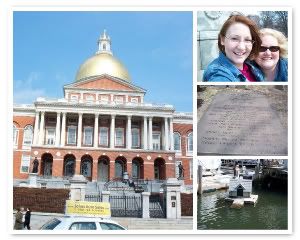
I cannot stress enough how easy the Mosaic Maker application is. I think, if possible, I will try to incorporate the application into a young adult program at my library. The program will allow the kids to become more aware of Web 2.0 tools and encourage creativity through those tools. If I don't use this application for a teen program, I can definitely use it to decorate the teen space in the new library or use the application to punch up posters and flyers. There are lots of other Web 2.0 tools out there for public use and I really have enjoyed all the ones I've tried so far in my 23 Things journey.
I cannot stress enough how easy the Mosaic Maker application is. I think, if possible, I will try to incorporate the application into a young adult program at my library. The program will allow the kids to become more aware of Web 2.0 tools and encourage creativity through those tools. If I don't use this application for a teen program, I can definitely use it to decorate the teen space in the new library or use the application to punch up posters and flyers. There are lots of other Web 2.0 tools out there for public use and I really have enjoyed all the ones I've tried so far in my 23 Things journey.
Subscribe to:
Posts (Atom)